
For B2B suppliers across the Middle East
Every RFQ followed up.Every quotation closed.
Dealplier uses AI to turn RFQ emails, quotations, approvals and follow-ups into one daily list for your sales team — in Arabic and English.
- Arabic & English
- Each company's data isolated
- Backups tested daily
Built for every supply sector
Wherever deals run on RFQs, quotations, approvals and follow-ups.
- HVAC & refrigeration
- Fire protection & safety
- Valves & pumps
- Electrical & cables
- Lighting
- Plumbing & sanitary
- Pipes & fittings
- Building materials
- Steel & metals
- Insulation
- Elevators & escalators
- ELV & security systems
- Generators & power
- Solar & energy
- Water treatment
- Oil & gas supplies
- Industrial equipment
- Medical equipment
- IT & networking
- Furniture & fit-out
- Chemicals & coatings
- Tools & hardware
- Packaging
- Spare parts & MRO
Why deals slip
Most supply deals aren't lost on price. They're lost in the follow-up.
RFQs buried in inboxes
Requests arrive by email with PDFs attached. Deadlines and references get missed before anyone opens a spreadsheet.
Quiet after the quotation
Once the quote is sent, nobody owns the next step. Validity expires while the consultant is still reviewing.
Approvals tracked by memory
Technical submittals, consultant comments and procurement status live in chats and heads, not in one place.
The product
One place from RFQ to purchase order
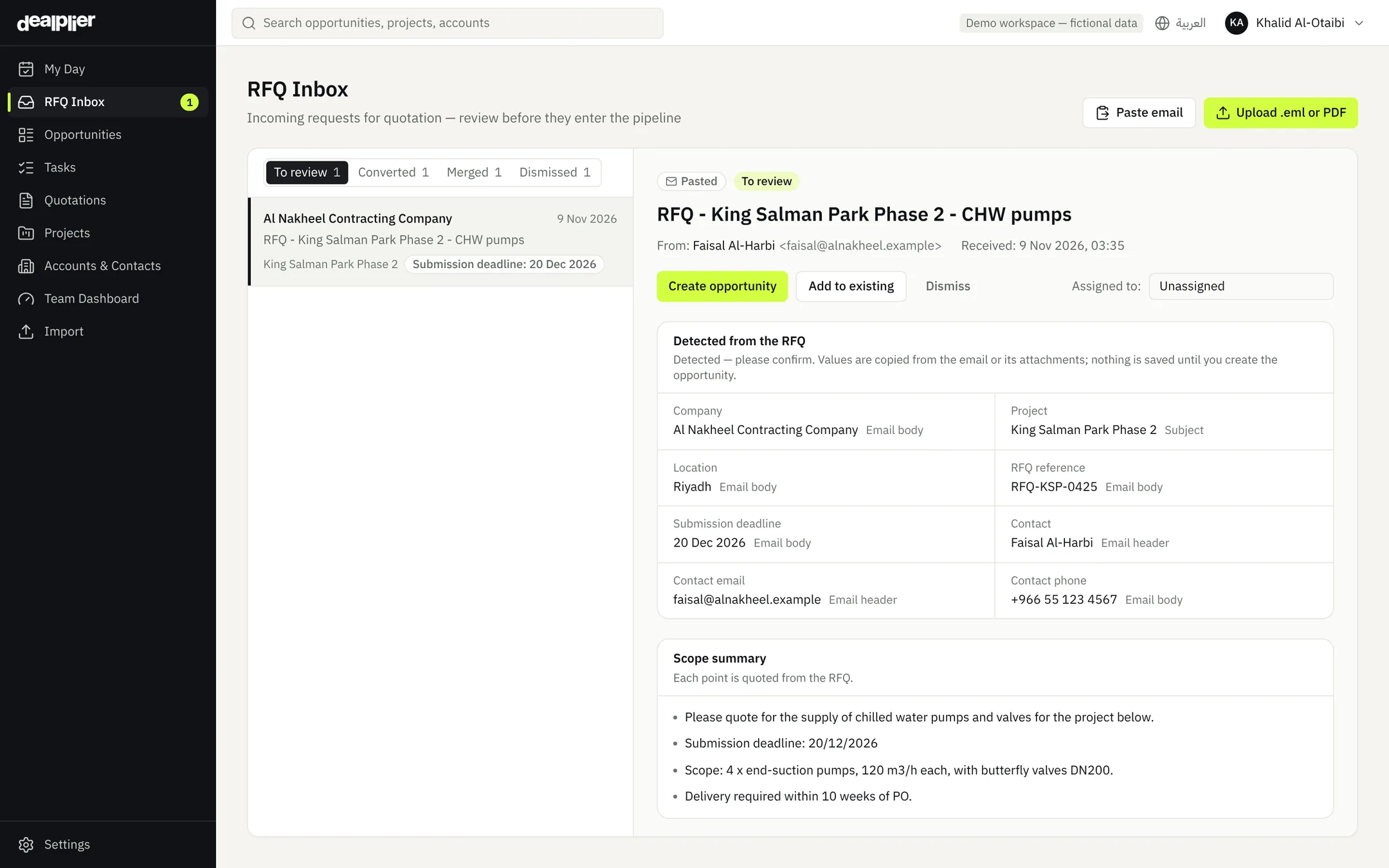
RFQs land in a review queue, not a pile
Forward RFQ emails or upload .eml and PDF files. Dealplier reads the company, project, reference and submission deadline — each value quoted from the source — and flags possible duplicates before anything enters your pipeline.
- Inbound email address per company
- Values shown with where they were found
- Convert, merge or dismiss in one step
AI built in
AI that does the reading. You make the decisions.
Dealplier uses AI where it saves hours — reading documents, summarizing and suggesting the next step — and always shows the source it relied on.
Reads RFQ emails and attachments
Pulls out the company, project, RFQ reference, submission deadline and contact, and flags possible duplicates.
Reads quotation PDFs
Detects quotation number, customer, issue and validity dates, total and currency — you confirm before anything is saved.
Summarizes RFQs and specifications
Key points of a document in seconds, each one quoted from the original text.
Suggests the next step
For every deal, a concrete next action based on what was recorded — accept, edit or dismiss.
Spots deals at risk
Silent customers, expiring quotations, rejected approvals and competitor mentions — each with its evidence.
Prioritizes every day
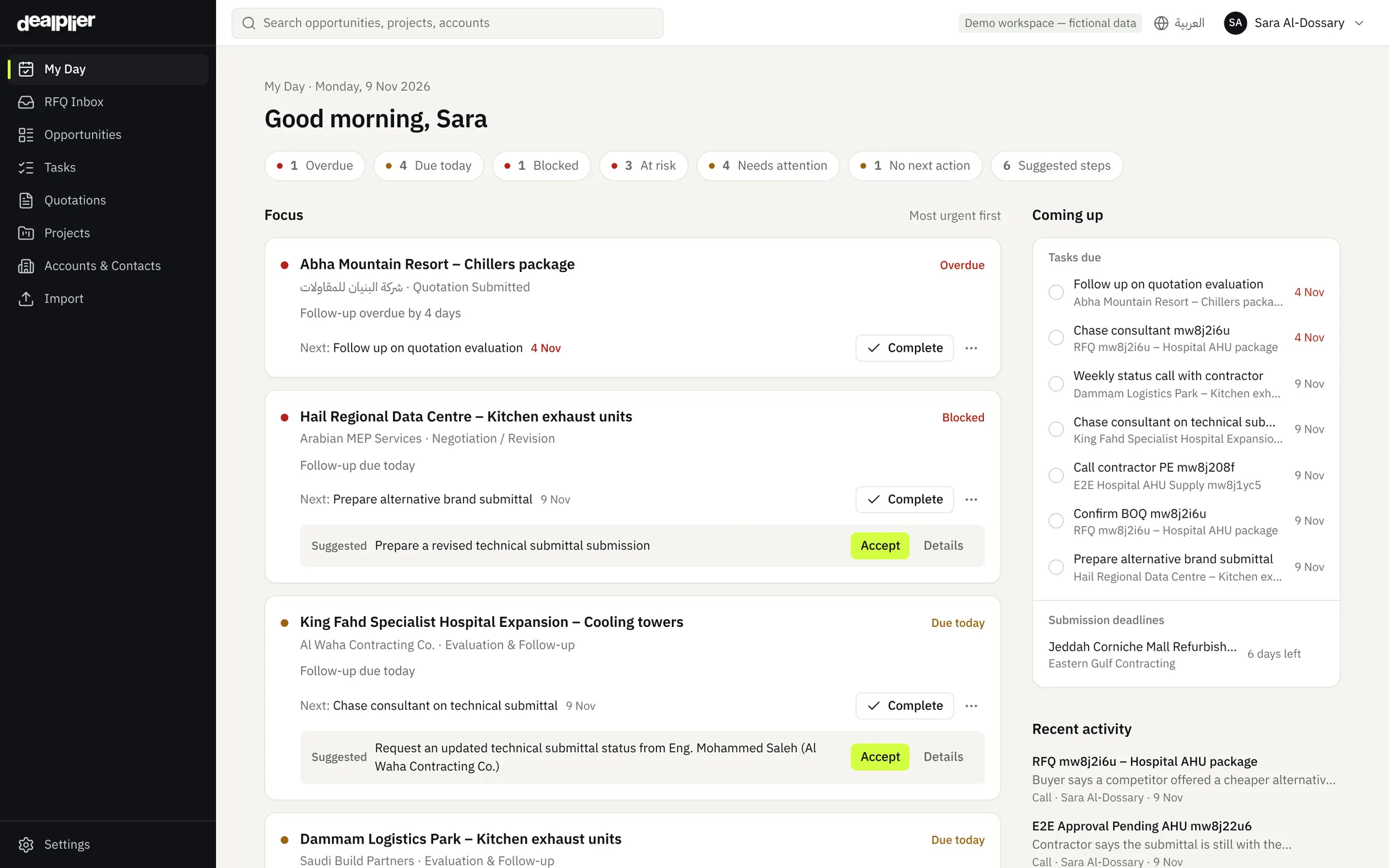
Ranks follow-ups and deadlines by urgency so each salesperson starts with what matters.
Links emails to the right deal
Matches an Outlook email to an opportunity by its reference, conversation, contact or content — and asks you when it isn't sure.
Finds technical questions in emails
A question in a linked email is suggested as a clarification to track, with the sentence it came from.
Shows what changed in a revision
Add a new version of a document and see the changed prices, dates and terms next to the old ones.
Guardrails, not guesswork
- Every value is an exact excerpt — if it isn't in the document, it isn't shown
- Nothing is saved until a person confirms it
- AI never sets prices or marks an approval as approved
- Instructions hidden inside documents are ignored
- Your data is never used to train models
- Admins can switch AI off at any time
Request an updated technical approval status from the consultant
Based on: Technical submittal (under review) · Call on 5 Nov
A customer saying “it's with the consultant” never marks an approval as approved. Only you can.
Everything included
All you need to run project sales
RFQ Inbox
Email intake, review queue, duplicates
Pipeline
Table and board, filters, search
My Day
Daily priorities for every salesperson
Tasks & follow-ups
Due dates, reminders, automatic escalation
Quotations
Revisions, validity, expiry alerts
Approvals & procurement
Submittals, consultant review, PO status
Customers & contacts
Contractors, consultants, end clients
Projects
Every opportunity linked to its project
Documents
Secure storage, preview and summaries
Excel import
Map columns, catch duplicates and errors
Team dashboard
Pipeline, workload, win and loss reasons
Email notifications
Invitations, resets and escalation alerts
Roles & permissions
Sales, manager, admin and your own roles
Audit log
Who changed what, and when
Arabic & English
Full right-to-left Arabic interface
Secure support access
Time-limited and read-only, with your permission
Outlook mailbox
Emails and attachments linked to deals
Technical clarifications
Numbered, owned, closed with an answer
Opportunity types
Own stages for projects, trading and tenders
Currencies
Daily exchange rates, locked on acceptance
How it works
Live in an afternoon
- 1
Bring your pipeline
Import opportunities from Excel or CSV, invite your team and set who manages whom.
- 2
Route RFQs to Dealplier
Forward RFQ emails to your company's inbound address or upload them, and connect Outlook so emails about each deal land on it.
- 3
Follow up every day
Each person opens My Day. Managers watch the dashboard. Overdue follow-ups escalate on their own.
Security
Your customers' data stays yours
Isolated per company
Every record is separated at the database level. Verified with live cross-company tests before release.
Roles and permissions
Sales, manager and admin roles enforced on the server, not just hidden in the interface.
Backups tested daily
Encrypted daily backups, restored automatically into a clean database to prove they work.
Full audit trail
Every change records who did it and when. Admins can review the log at any time.
Support only with permission
Our team can view your workspace only when your admin grants time-limited, read-only access.
Monitored around the clock
Errors, background jobs and scheduled tasks are monitored, with alerts when something fails.
Questions
Do I need to change how my customers send RFQs?
No. Keep your current address and forward RFQ emails to Dealplier, or upload them. Each company gets its own private inbound address, and each salesperson can connect their Outlook mailbox.
Does Dealplier read all my email?
No. When you connect Outlook, Dealplier keeps only the subject, sender and a short preview of recent inbox and sent messages, and only you can see them. An email is shared with your team once it is linked to an opportunity. Disconnecting deletes the synchronized messages; emails already linked stay in the deal's history.
Does Dealplier price my quotations?
No. Prices and technical specifications come from your team. Dealplier reads documents, tracks follow-ups and suggests next steps — you decide.
How does Dealplier use AI?
To read RFQ emails and quotation PDFs, summarize documents and suggest next steps. Every result shows its source and nothing is saved until a person confirms it. Admins can switch AI off in Settings.
Can we use it in Arabic?
Yes. Every screen, email and document view supports Arabic right-to-left. Each user chooses their language.
Can we import our existing pipeline?
Yes. Upload an Excel or CSV file, map the columns, review duplicates and errors, then import.
Where is our data stored and who can see it?
Your data is separated from every other company, accessible only to your users, and backed up daily. See the privacy policy for the providers and regions we use.